


Key takeaways: Healthcare workflow automation uses software and AI to move work from information received to action taken, with less manual intervention. In Documo’s 2026 survey of 139 healthcare operations leaders: 62% say more than a quarter of document work happens outside the EHR; 48% say document delays often or always hurt patient care; and 76% estimate that more than 10% of referrals never become a completed appointment.
Healthcare solved only half the interoperability problem
Healthcare has spent decades solving how information moves. Fax, then secure messaging, then EHR-to-EHR exchange, then APIs — each generation of technology made it easier for a document, a referral, or a result to travel from one system or organization to another.
That progress was real. It was also only half the problem.
Information can arrive successfully and the work it represents can still sit in a queue. A referral can land in an inbox and go nowhere for days. A prior authorization can reach the right fax number and still wait for someone to notice it, read it, and act. A medical record can be available electronically and still require a person to identify the patient, classify the document, and figure out what happens next.
Healthcare workflow automation uses software and AI to move administrative and operational work from information received to action taken, with less manual intervention. The value isn’t extracting information from a document. The value is getting the work that information represents completed.
This guide covers what healthcare workflow automation is, why it matters now, which workflows benefit most, how to evaluate software, and how to measure whether it’s actually working — grounded in Documo’s 2026 State of Healthcare Operations Report, based on a survey of 139 administrators, HIM, and IT leaders.
What is healthcare workflow automation?
Healthcare workflow automation is the use of software and AI to move administrative and operational work forward — from the moment information is received to the moment an action is taken — without requiring a person to manually review, key in, or route every step.
A simple example: a specialist’s office receives a referral by fax. Historically, a staff member opens it, reads it, identifies the patient and the requesting provider, checks insurance, and manually schedules an appointment or requests missing information. Workflow automation reads the referral, matches the patient, checks the information against what’s required, and either schedules the appointment or routes a clear exception to a person — automatically, in minutes instead of days.
The same pattern shows up well beyond referrals. Consider prior authorization: a payer requires clinical documentation before approving a procedure. Historically, a staff member gathers records, completes a payer-specific form, and follows up by phone to check status — often more than once. Workflow automation can extract the clinical details a given payer requires, complete the submission, and track status automatically, escalating only the cases that need a human decision.
Or patient intake: a new patient fills out forms on paper, through a portal, or over the phone before a visit. Historically, staff re-key that information into the EHR, chase missing fields, and reconcile it against insurance eligibility separately — often after the patient has already arrived. Workflow automation can validate completeness ahead of time, flag missing information back to the patient directly, and populate the EHR with clean data, so the visit starts ready instead of starting with a stack of forms to process.
The distinction that matters: digitizing information makes a document exist electronically. Advancing work means the process the document triggers actually moves forward. A healthcare organization can be fully digital and still have most of its operational work stuck between those two states.
Why does healthcare workflow automation matter now?
For most of the last decade, healthcare’s technology conversation was about interoperability in the narrow sense: can System A exchange data with System B? That question is largely being answered. EHR-to-EHR exchange, APIs, and secure messaging have made information movement dramatically more reliable than it was ten years ago.
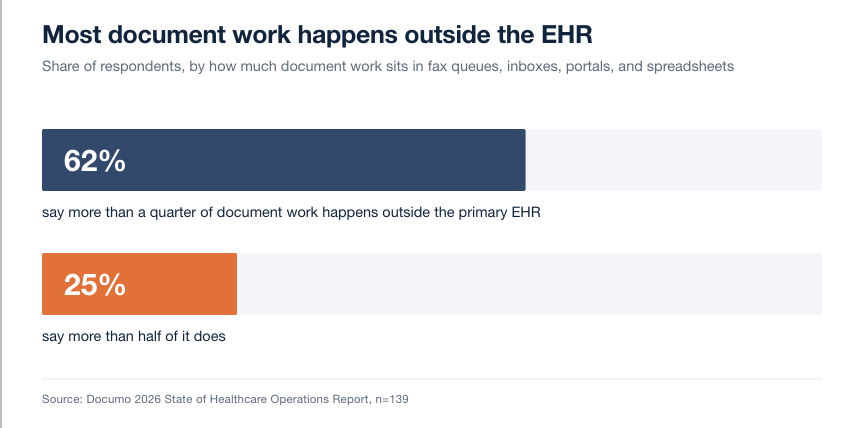
But solving data movement didn’t solve workflow movement. A growing share of healthcare’s operational work still happens around the EHR rather than inside it. The 2026 report found that 62% of respondents say more than a quarter of their document-related work happens outside the primary EHR, and 25% say more than half of it does — in fax queues, shared inboxes, portals, and spreadsheets, where information can arrive cleanly and still require a person to figure out what it means and what to do about it.
AI agents raise the stakes on getting this right. An agent that can read a document is not the same as an agent that can safely act on it inside a regulated healthcare workflow. That requires workflow context (what stage is this in, what’s already happened), permissions (who or what is allowed to take this action), system access (can it actually update the EHR or scheduling system), exception handling (what happens when the agent isn’t confident), and auditability (can you prove what happened and why). Healthcare workflow automation is the layer that makes AI agents safe and useful in this environment — not just capable of reading a document, but accountable for what happens next.
What does Documo’s research tell us?
Documo’s 2026 State of Healthcare Operations Report asked 139 administrators, health information management (HIM), and IT professionals how document-related work actually moves through their organizations. The pattern that emerged: workflow failures don’t stay abstract. They show up as missed appointments, delayed care, and lost revenue.
Methodology, briefly: The survey collected responses from 139 professionals working in mid-size hospitals, clinics, ambulatory care centers, nursing facilities, residential treatment centers, healthcare agencies, and surgical centers, recruited because they are directly involved in designing workflows, managing intake and routing, or purchasing and auditing compliance for their organization. The full report and methodology will be linked here once published.
Key findings at a glance:
- 62% of respondents say more than a quarter of their document-related work happens outside the primary EHR; 25% say more than half of it does.
- Among organizations where more than half of document work happens outside the EHR, 74% say more than half of incoming documents require manual review — compared with 36% among the least fragmented organizations.
- 48% of all respondents say document delays often or always negatively affect patient care. That figure rises to 80% among the most fragmented organizations and falls to 34% among the least fragmented — more than a twofold difference.
- 60% of organizations doing the most manual review believe more than half of that work could be automated with technology available today. Only 18% are actually investing in document workflow automation.
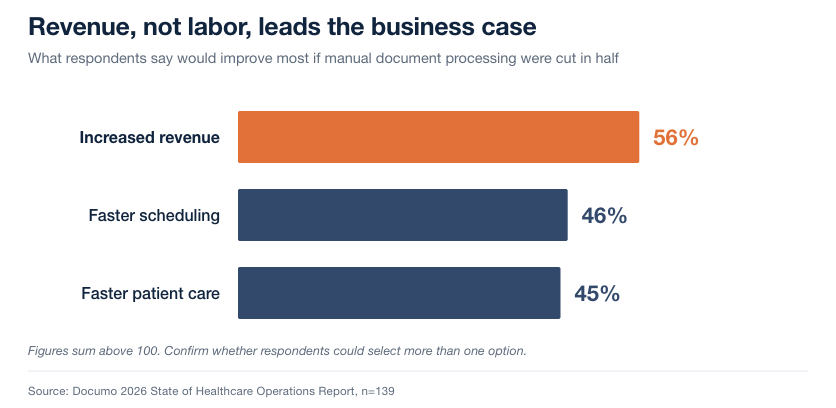
- When asked what would improve most from cutting manual document processing in half, 56% pointed to increased revenue — ahead of faster scheduling (46%) and faster patient care (45%). The ROI conversation has shifted from labor savings to revenue capture.
The clearest single example of the gap between exposure and investment is referrals. 76% of respondents estimate that more than 10% of referrals never become a completed appointment, and 45% estimate that leakage is above 20%. Referrals also rank among the workflows organizations associate with the greatest financial impact, alongside claims.
Here’s where it gets counterintuitive. When asked which single workflow they would prioritize automating first, respondents chose:
| Workflow | Share choosing it as top automation priority |
|---|---|
| Claims | 27% |
| Prior Authorization | 21% |
| Patient Intake | 17% |
| Referrals | 12% |
Referrals are highly manual, carry real financial weight, and are visibly leaking — and they’re still the workflow least likely to get automated first. We call this the Referral Automation Blind Spot: the gap between how much a workflow costs an organization and how much attention it gets when an automation budget gets allocated. It’s a pattern worth watching, since it suggests automation investment is currently following habit and workflow familiarity more than it’s following actual financial exposure.
Why does fragmentation create manual work?
Underneath most workflow failures is the same root cause: fragmentation. Healthcare information crosses EHRs, fax, email, patient portals, direct secure messaging, uploaded documents, payer systems, and scheduling tools — often for the same patient, the same referral, or the same authorization. When those systems don’t share context with each other, a person has to.
That’s what “staff become the integration layer” means in practice. A referral coordinator isn’t just processing referrals — they’re manually reconciling what the fax says, what the EHR shows, what the payer portal requires, and what the scheduling system needs, because no system is doing that reconciliation for them.
Manual work is the most visible symptom, but it’s not the only one. Delays, transcription errors, dropped handoffs between systems, and poor visibility into where something actually sits in a process are all downstream of the same fragmentation — and the effect compounds. Organizations where more than half of document work happens outside the EHR are roughly twice as likely to require heavy manual review (74% vs. 36%) and roughly twice as likely to report that delays hurt patient care (80% vs. 34%) as organizations with the least fragmented workflows.
This is why simply adding another point solution rarely fixes the underlying problem. A better fax tool or a better intake form still hands a person the job of connecting it to everything else.
Signs your organization has a workflow gap
Not sure whether this applies to your organization? A few questions, each grounded in what the 2026 report found across 139 healthcare operations leaders:
- Does more than a quarter of your document-related work happen outside your primary EHR — in fax, email, portals, or spreadsheets? If so, you’re already part of the 62% majority, and likely dealing with the roughly twofold higher manual-review burden (74% vs. 36%) that comes with that level of fragmentation.
- Do staff regularly have to figure out what a document is and what to do with it, rather than the system telling them? That’s the Understand and Decide stages of the framework below happening manually, one document at a time.
- Do referrals, prior authorizations, or intake forms sit in a queue waiting for a person to notice them, rather than moving automatically to the next step? 45% of surveyed organizations estimate that more than 20% of referrals never convert to a completed appointment — a queue problem with a real revenue consequence.
- Do you track your denial rate, but not your time-to-first-action on an incoming document? Activity is often measured; the workflow-level outcome that actually matters often isn’t.
- Is your automation conversation focused on one workflow because it’s familiar, not because it’s the most exposed? The research found referrals carry real financial impact but rank last in automation investment priority among the workflows covered — the Referral Automation Blind Spot described above.
If two or more of these sound familiar, the gap this guide describes is very likely showing up somewhere in your organization today — even if your documents are already digital.
The Documo Information-to-Action Framework
Closing the gap between information arriving and work happening requires more than automating individual tasks. It requires orchestration — coordinating information, systems, business rules, and people so a workflow keeps moving toward an outcome, not just so one step gets faster.
Documo frames this as five stages:
Receive. Information arrives through fax, email, direct secure messaging, EHR, patient portal, API, or another channel.
Understand. The system identifies what kind of document or request this is and extracts the information the process actually requires.
Decide. Using context, business rules, and confidence thresholds, the system determines the appropriate next step — and whether a person needs to be involved before it proceeds.
Act. The work is routed, a connected system is updated, the next process step is triggered, or a clear exception is handed to a person.
Track. Status, exceptions, and outcomes stay visible, so anyone can see whether a workflow actually progressed toward its intended result.
[Diagram: Receive → Understand → Decide → Act → Track]
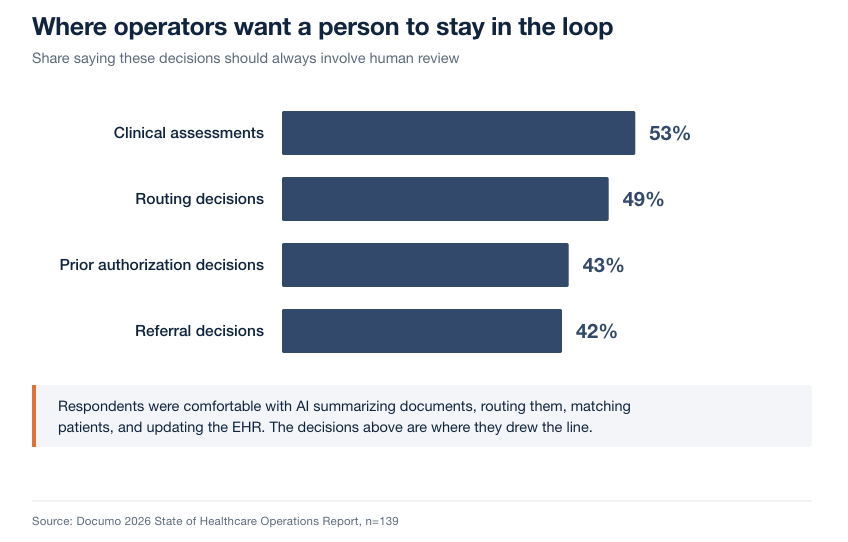
This framework describes the direction and requirements of modern healthcare workflow automation — it is not a claim that every implementation performs every stage without human involvement. In practice, well-defined, high-confidence document types can move through Receive, Understand, and Act with minimal manual touch today, while lower-confidence or higher-stakes decisions are still — correctly — routed to a person at the Decide stage. This lines up with what healthcare operators themselves say they want: respondents were comfortable with AI summarizing documents, routing them, matching patients, and updating the EHR, but a majority said clinical assessments (53%), routing decisions (49%), prior authorization decisions (43%), and referral decisions (42%) should always keep a person in the loop. Which stages can run with less human involvement, and which should always require review, is itself one of the more important design decisions in any healthcare workflow automation deployment.
Which healthcare workflows can be automated?
Most healthcare document workflows can benefit from automation, but four consistently carry the most operational and financial weight.
Referral workflow automation. A referral typically arrives as a fax, portal message, or EHR-to-EHR transmission containing a patient, a requesting provider, clinical context, and an implied next step: schedule an appointment. Manually, a coordinator reads the referral, confirms the patient’s identity and insurance, checks the receiving provider’s availability, and follows up if anything is missing — often across several disconnected systems. Automated, the same referral can be classified, matched to the patient record, checked against scheduling rules, and either booked automatically or routed as a clear exception. The metrics that move: referral-to-appointment conversion, time to first action, time to schedule, and — because every unconverted referral is a visit that never happened — provider capacity and revenue. Referrals carry the widest gap between financial exposure and automation attention of any workflow covered here; see the Referral Automation Blind Spot above.
Prior authorization workflow automation. A payer requires clinical documentation before approving a procedure, medication, or service. Manually, staff gather records, complete payer-specific forms — which vary by payer and rarely match each other — and follow up by phone or portal to check status, sometimes more than once per case. Automated, the system can extract the clinical detail a given payer requires, complete the submission in the correct format, and track status automatically, escalating only the cases that need a human decision or additional documentation. The metrics that move: turnaround time, completeness of first submission, rework rate, denial rate, and time to care for the patient waiting on the decision. 21% of 2026 respondents named prior authorization their top automation priority — the second-highest share after claims.
Patient intake automation. A new or returning patient completes forms — on paper, through a portal, or over the phone — ahead of a visit. Manually, staff re-key that information into the EHR, chase missing fields, and separately reconcile it against insurance eligibility, often after the patient has already arrived. Automated, the system can validate completeness before the visit, flag missing information back to the patient directly, and populate the EHR with clean, structured data. The metrics that move: intake completion rate, staff touches per patient, data quality, and pre-visit readiness — which affects both patient experience and how smoothly the visit itself runs. 17% of respondents named patient intake their top automation priority.
Medical document workflow automation. Beyond these three named workflows, most healthcare organizations handle a long tail of other incoming documents — records requests, results, correspondence, clinical notes — that need the same underlying capability: classify what the document is, extract what matters, validate it, route it to the right system or person, and manage exceptions when something doesn’t fit the expected pattern. This is the general-purpose layer that referral, prior authorization, and intake automation are all built on top of. See: [Intelligent Document Processing].
Claims and revenue-cycle document workflows can benefit from the same underlying approach where document intake and routing are the bottleneck, though Documo is a document workflow and communications platform, not a full revenue cycle management system.
OCR vs. IDP vs. workflow automation vs. RPA vs. AI agents
These terms get used interchangeably, but they describe different layers of the same stack, each building on the one before it. OCR turns an image into text. IDP uses OCR plus AI to understand what that text means — what kind of document this is, and what data it contains. Workflow automation takes IDP’s structured output and decides what should happen next, using business rules. RPA can execute simple, repetitive digital steps inside that workflow, but struggles when a process has real variation. An AI agent sits on top of all of it — capable of reading, deciding, and acting across systems, but only as safe as the workflow context, permissions, and audit trail underneath it. Skipping a layer doesn’t eliminate the problem it solves; it just means a person has to fill in for whichever layer is missing.
| Technology | What it does | What it doesn’t do |
|---|---|---|
| OCR (Optical Character Recognition) | Converts an image of text into machine-readable text | Doesn’t understand what the document is or what to do with it |
| IDP (Intelligent Document Processing) | Classifies documents, extracts structured data, and validates it using AI and OCR together | Creates usable information; doesn’t on its own advance the workflow the document belongs to |
| RPA (Robotic Process Automation) | Automates repetitive, rule-based digital tasks by mimicking clicks and data entry | Brittle when a process has variation, exceptions, or requires judgment |
| Workflow automation | Uses extracted information plus business rules to move work from step to step toward an outcome | Depends on IDP or another input to get clean information in the first place |
| AI agents | Can make context-aware decisions and take multi-step action across systems | Needs the guardrails above — permissions, exception handling, auditability — to operate safely in a regulated environment |
The distinction that matters most: extraction creates usable information. Workflow automation uses that information to advance the work. A tool that only does the first half will digitize your documents without closing the gap between information arriving and action happening.
What should healthcare organizations automate first?
Prioritize based on five factors, in roughly this order:
- Business or patient consequence. Where does delay or error create the most risk — to revenue, to patient access, or to compliance?
- How much of the work happens manually or outside the EHR. The more fragmented a workflow already is, the more there is to gain from orchestrating it.
- Volume. Higher-volume workflows return automation investment faster.
- Measurability. Choose workflows where you can clearly define and track an outcome metric, not just an activity metric.
- Exception complexity. Workflows with too many unpredictable exceptions may need a phased approach — automate the common path first, and build out exception handling before attempting full end-to-end automation.
Referrals and prior authorization frequently score high across all five factors, which is consistent with what the 2026 report found: both carry real financial weight and real manual burden, even though — per the Referral Automation Blind Spot above — that isn’t yet fully reflected in automation investment.
More broadly, the research found real appetite outstripping real investment across the board. 60% of the most manual-review-heavy organizations believe more than half of that work could be automated with today’s technology. Only 18% are actually investing in document workflow automation. That gap between belief and budget is itself a useful prioritization signal — it suggests most organizations have already done the harder work of recognizing where automation would help, and the remaining barrier is choosing where to start.
How to evaluate healthcare workflow automation software
Look past feature lists and evaluate against these questions:
- Desired outcome. What business or patient outcome is this supposed to move, and can the vendor tie their capability to it directly?
- Workflow entry points. Which channels does it actually cover — fax, email, direct secure messaging, portal, EHR, API?
- Structured vs. unstructured information. Can it handle documents that aren’t in a predictable format, not just structured forms?
- Channel coverage. Does it unify multiple inbound channels, or does it solve just one?
- EHR and downstream integrations. Can it act on information, not just read it — updating the EHR or triggering the next system in the process?
- Exception handling. What happens when the system isn’t confident? Is that handled gracefully, or does it silently fail or block the whole queue?
- Human-in-the-loop controls. Can you configure which decisions always require a person, and does that hold up to audit?
- HIPAA, security, and auditability. Is there a clear compliance and audit trail for every automated action?
- Outcome measurement. Does the platform report on outcomes, not just processing volume?
- Ability to extend across workflows. Will this solve just today’s problem, or can it extend to referrals, prior auth, intake, and general document workflows as your needs grow?
Solution categories to be aware of, without picking a specific vendor here: EHR-native automation modules, patient-access platforms, revenue cycle management (RCM) platforms, general-purpose RPA/low-code/AI platforms, and healthcare-specific document workflow platforms. Each approaches the problem from a different starting point, and the right fit depends heavily on which channels and workflows matter most to your organization.
Red flags to watch for during evaluation:
- A demo that only shows the perfect workflow — ask specifically how the system handles a document it doesn’t recognize or isn’t confident about.
- No clear answer on where human review sits in the workflow, or an implication that everything runs fully autonomously from day one.
- Integration described as “possible” rather than demonstrated — ask to see a live write-back to a test EHR or scheduling system, not just a read.
- No workflow-level outcome reporting — if the platform can only tell you how many documents it processed, it can’t tell you whether the workflow actually improved.
- Pricing or scope that only covers one channel (for example, fax) when your actual document intake spans several.
How to measure healthcare workflow automation ROI
Separate activity metrics — which show something is running — from outcome metrics, which show it’s actually working.
Activity and efficiency metrics:
- Processing time per document or request
- Staff touches per transaction
- Exception rate
- Manual review rate
- Cost per transaction
Outcome metrics:
- Referral conversion rate
- Time to schedule
- Authorization turnaround time
- Denial and rework rate
- Throughput
- Provider capacity utilization
- Revenue capture
- Patient access / speed to care
A workflow automation deployment that improves activity metrics without moving outcome metrics hasn’t actually closed the gap — it’s made the queue move faster without necessarily making the queue matter less. This is increasingly how healthcare leaders themselves frame the value. When asked what would improve most from cutting manual document processing in half, 56% pointed to increased revenue — ahead of faster scheduling at 46% and faster patient care at 45%. The ROI conversation has shifted from labor savings to revenue capture, which is exactly why outcome metrics, not just activity metrics, belong in the business case.
A simple way to think about the math. The following is an illustrative framework for estimating impact — substitute your own organization’s numbers rather than treating the figures below as a validated result.
Suppose your organization receives 1,000 referrals a month, and — consistent with what a meaningful share of surveyed organizations estimate — roughly 20% never convert to a completed appointment. That’s 200 referrals a month representing a scheduled visit, a provider’s time, and revenue that never happened. If workflow automation improves conversion by even five percentage points, by catching missing documentation faster or scheduling automatically instead of waiting in a queue, that’s 50 additional completed appointments a month. At a hypothetical average visit value of $150 — substitute your own payer mix and visit type — that’s $7,500 in monthly patient revenue that was previously walking away before anyone measured it. Run the same exercise against your denial rate, your authorization turnaround time, or your intake completion rate, and the outcome-metrics list above turns into a business case instead of just a reporting dashboard.
From data exchange to an action layer
Data exchange asks whether the information arrived. Workflow orchestration asks what happened next.
That’s the shift underneath everything in this guide. AI alone doesn’t solve fragmentation — a smarter model reading a fax still needs somewhere to put what it learns, rules for what to do next, and a way to hand off exceptions to a person. Orchestration is what converts intelligence into operational action: it’s the layer that decides, routes, updates, and tracks, so the work an AI system understands actually gets completed.
How Documo fits
Documo combines healthcare communication infrastructure — cloud fax, direct secure messaging, and document intake — with AI-powered intelligent document processing and workflow automation, to help organizations receive, classify, extract, validate, and route incoming healthcare information into the systems and processes where the work actually happens.
This applies most directly to referrals, prior authorization, patient intake, medical records, and other document-driven workflows that often begin outside a structured EHR process — the exact workflows this guide and Documo’s 2026 research focus on.
As with the Information-to-Action Framework above, this describes the direction of Documo’s platform and the problems it’s built to address, not a claim that every workflow runs with zero human involvement today. Implementation depth varies by document type, workflow, and how much a given organization chooses to automate versus keep human-reviewed.
Turn healthcare information into action, so the work it represents can move forward.
[Assess Your Workflow →] See where manual handoffs, disconnected systems, and document-heavy processes are slowing care, capacity, or revenue — and identify the best opportunities for automation.
Frequently Asked Questions
What is healthcare workflow automation?
Healthcare workflow automation uses software and AI to move administrative and operational work from information received to action taken, with less manual intervention. It covers workflows like referrals, prior authorization, and patient intake, turning documents and requests into completed actions instead of items sitting in a queue.
What is healthcare document workflow automation?
Healthcare document workflow automation is the process of classifying, extracting information from, validating, and routing healthcare documents – like referrals, records, or authorization forms — so the work they represent moves forward automatically instead of requiring a person to manually read and act on each one.
What is the difference between IDP and workflow automation?
Intelligent Document Processing (IDP) extracts and structures information from a document. Workflow automation uses that information, plus business rules, to move the work forward – scheduling, routing, updating a system, or flagging an exception. IDP creates usable information; workflow automation acts on it.
Can fax-based healthcare workflows be automated?
Yes. Modern cloud fax and intelligent document processing can classify incoming faxes, extract the relevant information, match it to a patient or record, and route it into the correct workflow automatically – without eliminating fax as a compliant, widely used channel in healthcare.
Can workflow automation integrate with an EHR?
Yes, when the platform supports it. Workflow automation should be able to read from and write to a connected EHR – for example, updating a chart or triggering a scheduling action — rather than only working in a separate system disconnected from where care teams actually work.
What healthcare workflow should an organization automate first?
Prioritize based on business or patient consequence, how much of the workflow happens manually or outside the EHR, transaction volume, how measurable the outcome is, and exception complexity. Referrals and prior authorization frequently score high on all five factors.
How do AI agents fit into healthcare workflow automation?
AI agents can read and act on healthcare information, but need workflow context, permissions, system access, exception handling, and auditability to do so safely. Workflow automation provides those guardrails, turning an agent’s understanding of a document into an accountable, auditable action.
How should healthcare organizations measure automation ROI?
Track activity metrics – processing time, staff touches, exception rate — alongside outcome metrics like referral conversion, authorization turnaround, denial rate, and revenue capture. Activity metrics show something is running faster; outcome metrics show whether the automation is actually improving results.
What is healthcare administrative workflow automation?
Healthcare administrative workflow automation applies automation and AI specifically to non-clinical operational work — referrals, prior authorization, intake, and related document handling — rather than clinical decision-making. It reduces manual data entry, routing, and follow-up so staff spend less time on paperwork and more time on tasks that require judgment.
How much does healthcare workflow automation cost?
Cost varies by channel coverage, document volume, and how many workflows are automated; vendors typically price by usage, seats, or workflow scope rather than a single flat rate. Weigh cost against outcome metrics – referral conversion, denial rate, revenue capture – not just against staff time saved.
Is healthcare workflow automation secure and HIPAA-compliant?
It should be. Look for a documented HIPAA compliance program, encryption in transit and at rest, role-based access controls, and a clear audit trail for every automated action, not just for data storage. Ask specifically how the platform handles PHI during document classification and extraction, since that’s where unstructured data is most exposed.