
eClinicalWorks Integration
Documo and eClinicalWorks
Cloud Fax & AI Built for eClinicalWorks Workflows
Ambulatory and outpatient practices on eClinicalWorks face a constant flow of inbound documents — referrals, lab results, records requests, prior auths. Documo integrates cloud fax and intelligent document processing directly with eClinicalWorks, so staff can file every document into the patient chart without leaving their workflow.
Why Documo and eClinicalWorks Matters
Even with a modern EHR, fax stays a critical channel for ambulatory practices. Documo keeps it from slowing you down.
File Into the Chart Without Leaving Documo
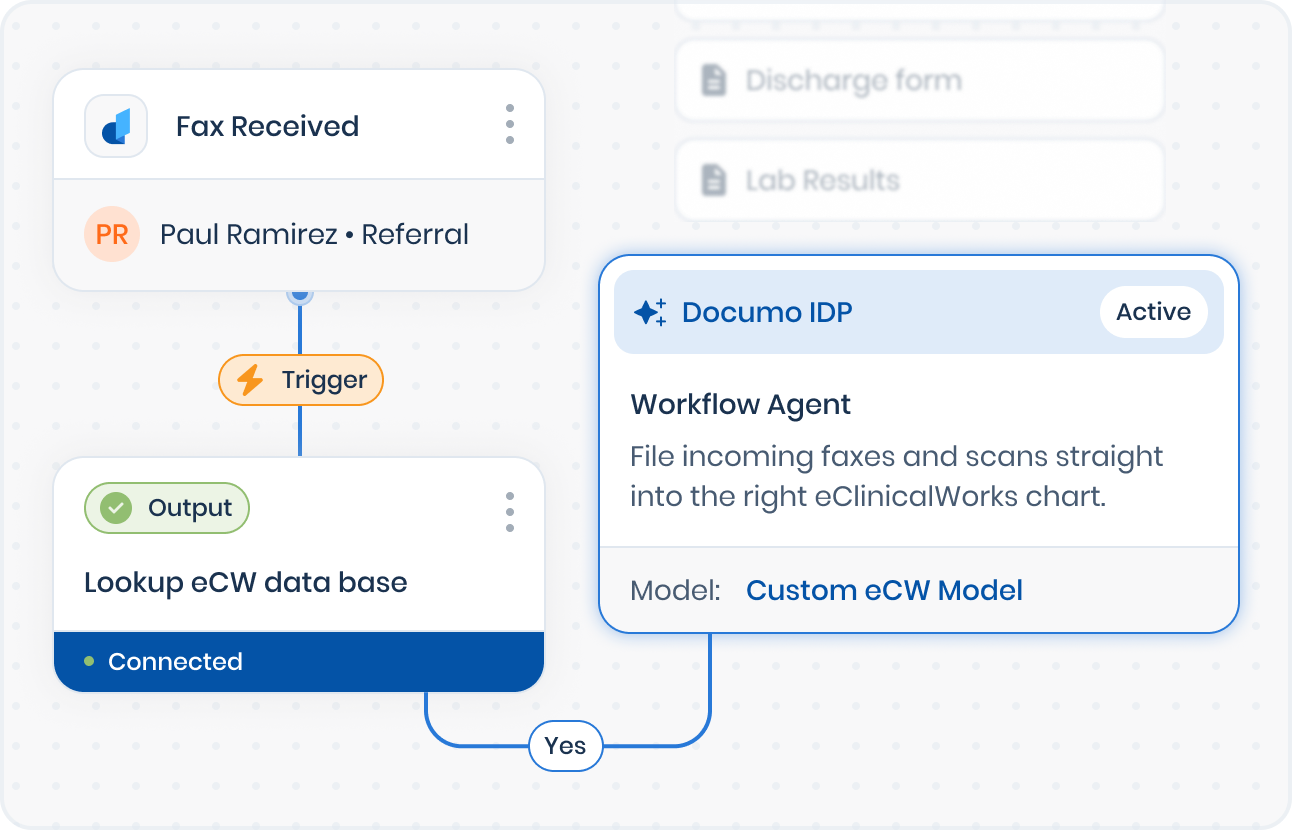
Send incoming faxes and documents straight into the patient's chart in eClinicalWorks, all from inside Documo.
Patient Search and Match Built In
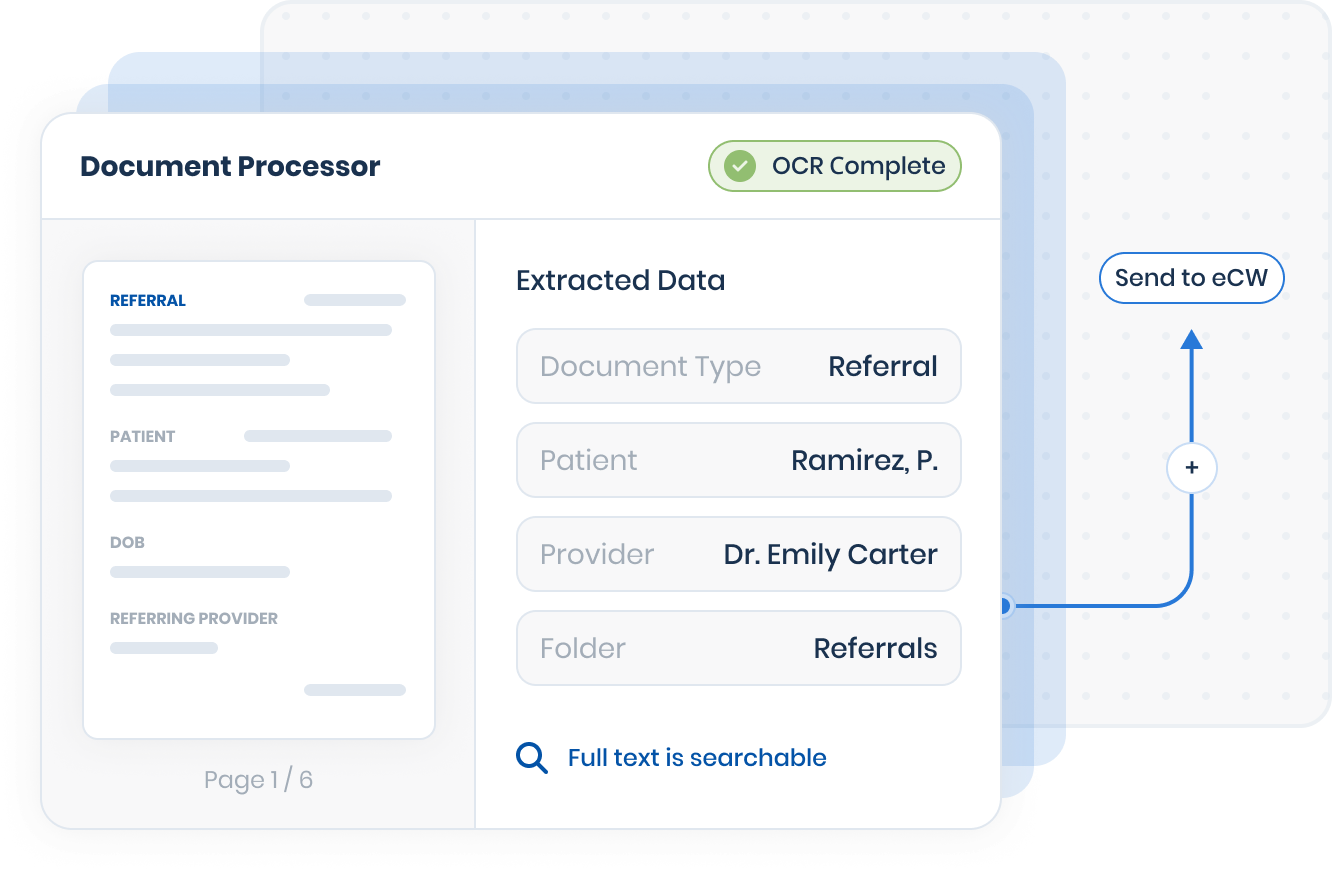
Find and confirm the right patient inside the document processing workflow, before anything is filed.
Right Provider, Right Folder
Assign each document to the correct provider from the practice's own provider list, and choose the folder where it belongs.
No More Duplicate Work in Two Systems
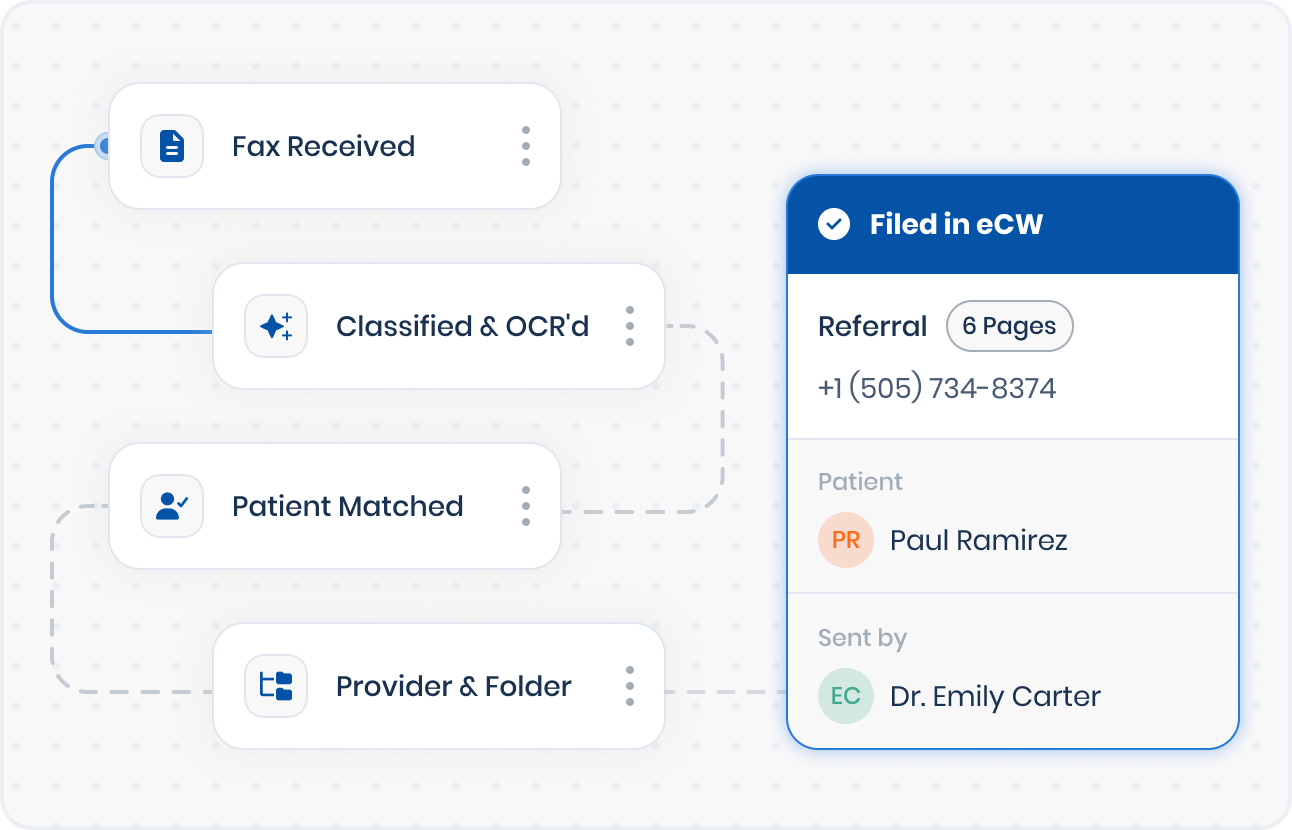
Today, eCW practices receive a fax in one system, then manually switch into eClinicalWorks to find the patient, pick a folder, and file the document. Every single document means doing the work twice.
Documo brings that entire filing workflow inside one place.
Four Steps, Every Document
File Documents Straight Into the Patient Chart
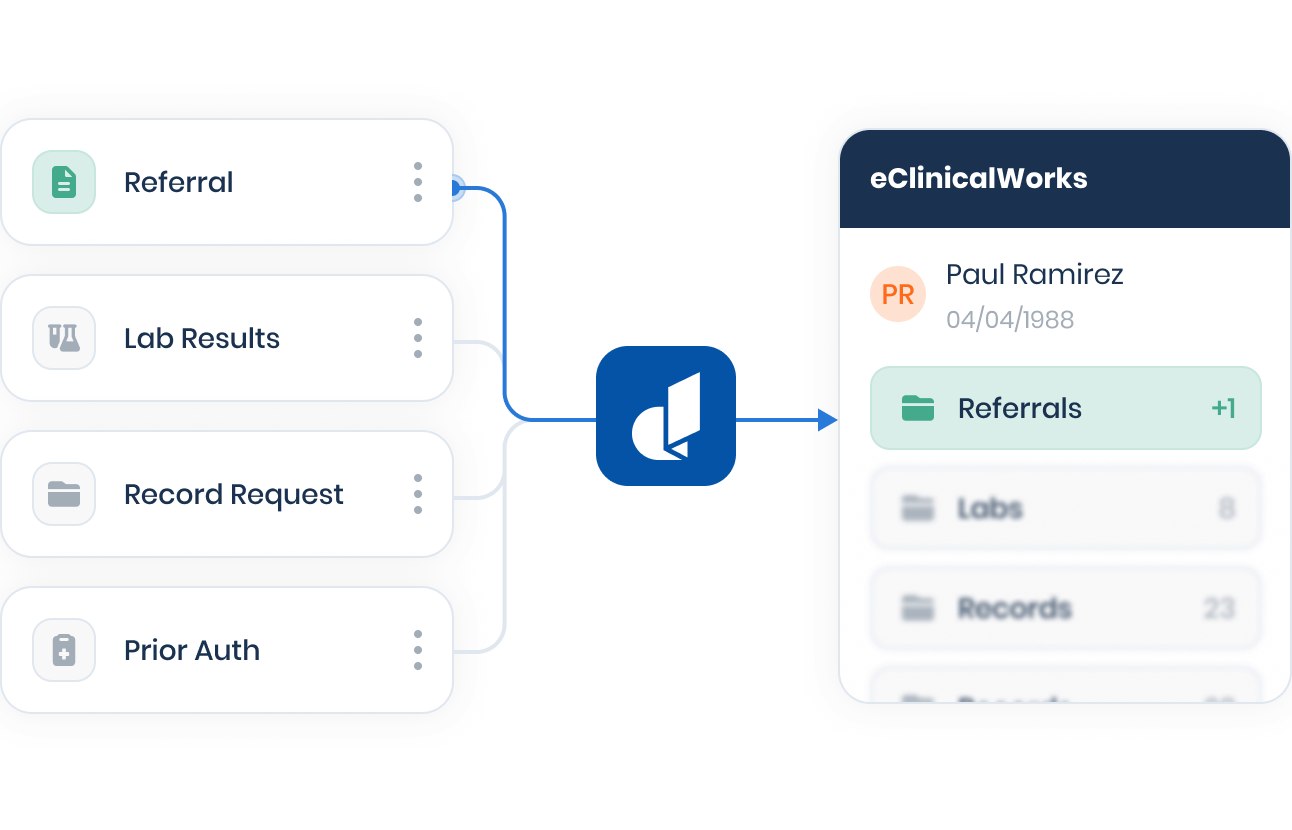
Incoming faxes and documents go directly to the right chart in eClinicalWorks, so receiving and filing become one step.
Match the Patient in the Workflow
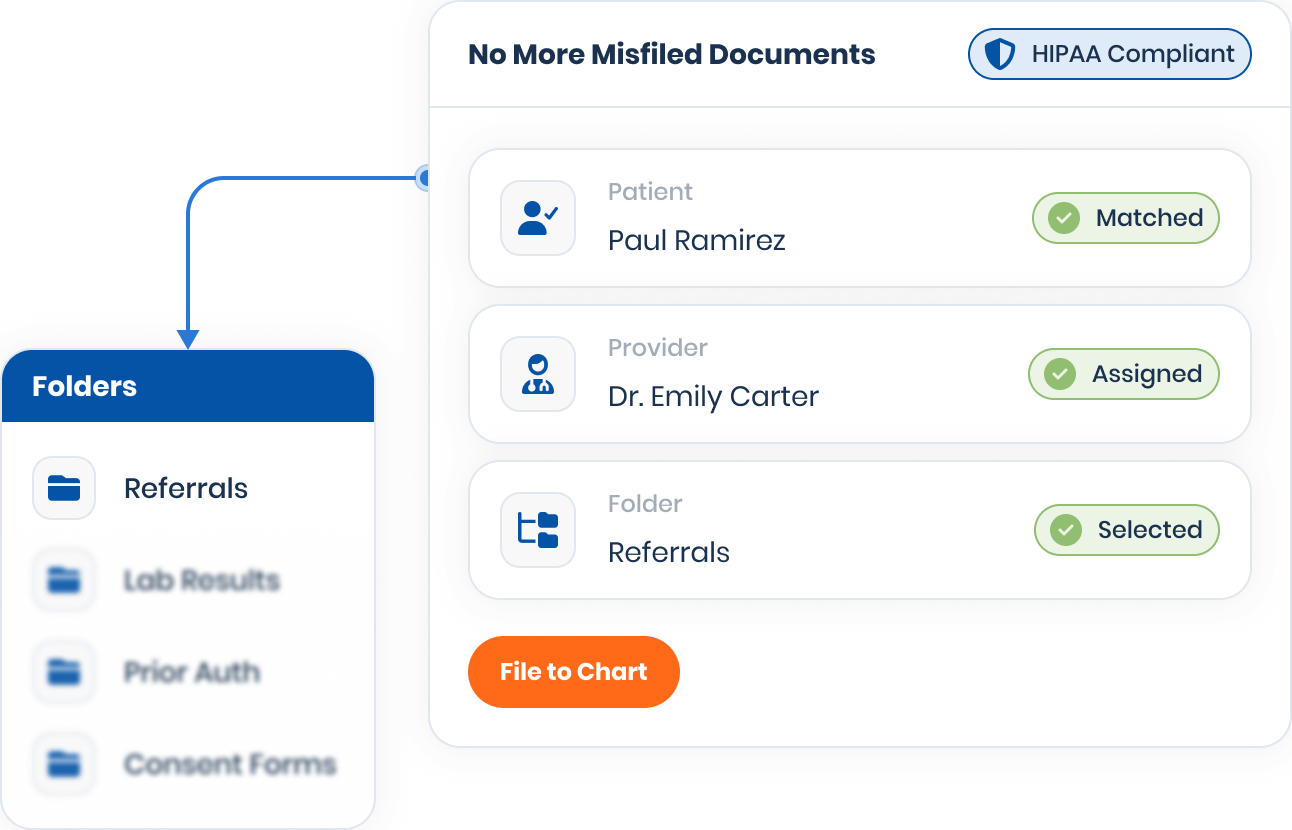
Patient search and match is built into document processing, so the document is tied to the correct record before it lands.
Assign the Provider and Folder
Pick the right provider from the practice's own provider list, and select the folder or category so records land where the practice expects them.
Capture Status and Priority
Record who scanned the document and when, mark documents reviewed, and flag high-priority items for fast follow-up.
AI That Reads the Document So Your Team Doesn't Have To
Documo's AI-enabled workspaces streamline document handling by identifying patients, classifying document types, and turning faxes and scanned uploads into searchable text.
Paired with the eClinicalWorks integration, that means less manual sorting before a document reaches the chart, and a workflow tuned to how the practice actually files.
Give Your Clinicians Their Time Back.
Keep Fax From Slowing Down Your Workflow
Less switching, fewer misfiles, more time for patients.
Process Inbound Faxes and File Them to eClinicalWorks
Handle referrals, lab results, records requests, and prior auths in Documo, then file each one to the right chart in eClinicalWorks without opening a second system.
Reduce Lost or Misfiled Documents
Patient match, provider assignment, and folder selection happen before the document is filed, so it reaches the correct record the first time.
Free Staff From Repetitive Manual Filing
Staff stop re-finding patients and re-filing documents across two systems, so they can spend less time on paperwork and more on patient care.
Before
Open fax system.
Switch to eClinicalWorks.
Re-find the patient.
Pick folder, file again.
4 steps
per document
With Documo
Review and file in Documo.
- Patient matched.
- Provider assigned.
- Filed to chart.
1 step
per document
A Published eCW App, Activated by the Practice
Documo is a published app in the eClinicalWorks FHIR App Gallery, built on eCW's FHIR R4 APIs. Activation is simple and stays in the practice's hands.
No IT Project
Activation Stays With the Practice
No Interface Engine
Add Documo via Activation Code
From inside eClinicalWorks, the practice admin adds Documo using an activation code.
Documo Approves the Practice
Documo reviews and approves the practice so the connection is ready to turn on.
The Admin Clicks Activate
The practice admin clicks Activate, and the integration is live. Filing to the chart can begin.
Documo meets all of our security standards and our doctors' security needs as well. We enjoy how simple it is to send or receive a fax from/to email, and the reliability has been a plus.
Heather Monte, Director of OperationsDirectRx

The answer used to always be "I can't find it." Even if we hadn't processed it yet, we have a much easier time finding it and getting it processed while the patient is still on the phone than we used to.
Samantha Contreras, Product ManagerEye Associates For New Mexico
For us, the API was the whole story. We needed fax to live inside our own systems - not a separate portal our team had to manage. Documo's API gave us the programmatic control to build fax directly into our workflows, handle thousands of documents a day without touching them manually, and scale without adding infrastructure. Most fax solutions don't offer that depth of API access. That was the deciding factor.
Jason Riddle, Chief Technology OfficerRegalo Health

The hands-down greatest advantage we see is that Documo is a lab equalizer. Any telehealth provider working at national volume deals with dozens of reporting labs, each with its own portal, its own credentials, and its own two-factor setup. Pulling results from every one of them is a complex affair and a heavy staff training burden. This solution lets us set a preference that all labs arrive by fax, which reduces the problem to the simplest possible standard, and Documo then elegantly finishes the job by pinpointing the chart and filing to it.
Daniel Lalonde, Chief Operating OfficerRed Leaf Wellness Inc.